
Is CTRTool a Fit for CTR Manipulation as a SearchSEO Alternative?
You are weighing a CTR tool against a SearchSEO-style approach and cannot tell where the two overlap. Both promise clicks on your target keywords, but they differ in how visits are executed, documented and controlled. That gap decides whether your budget buys measurable activity or guesswork.
This article defines what CTRTool actually is, maps it against the CTR manipulation use case, and separates the overlap from the differences. You will also see how campaign controls, screenshot proof and the credit model work, so you can judge whether it fits your keywords, locations and daily volume before committing.
What Is CTRTool? The CTR Campaign Platform Defined
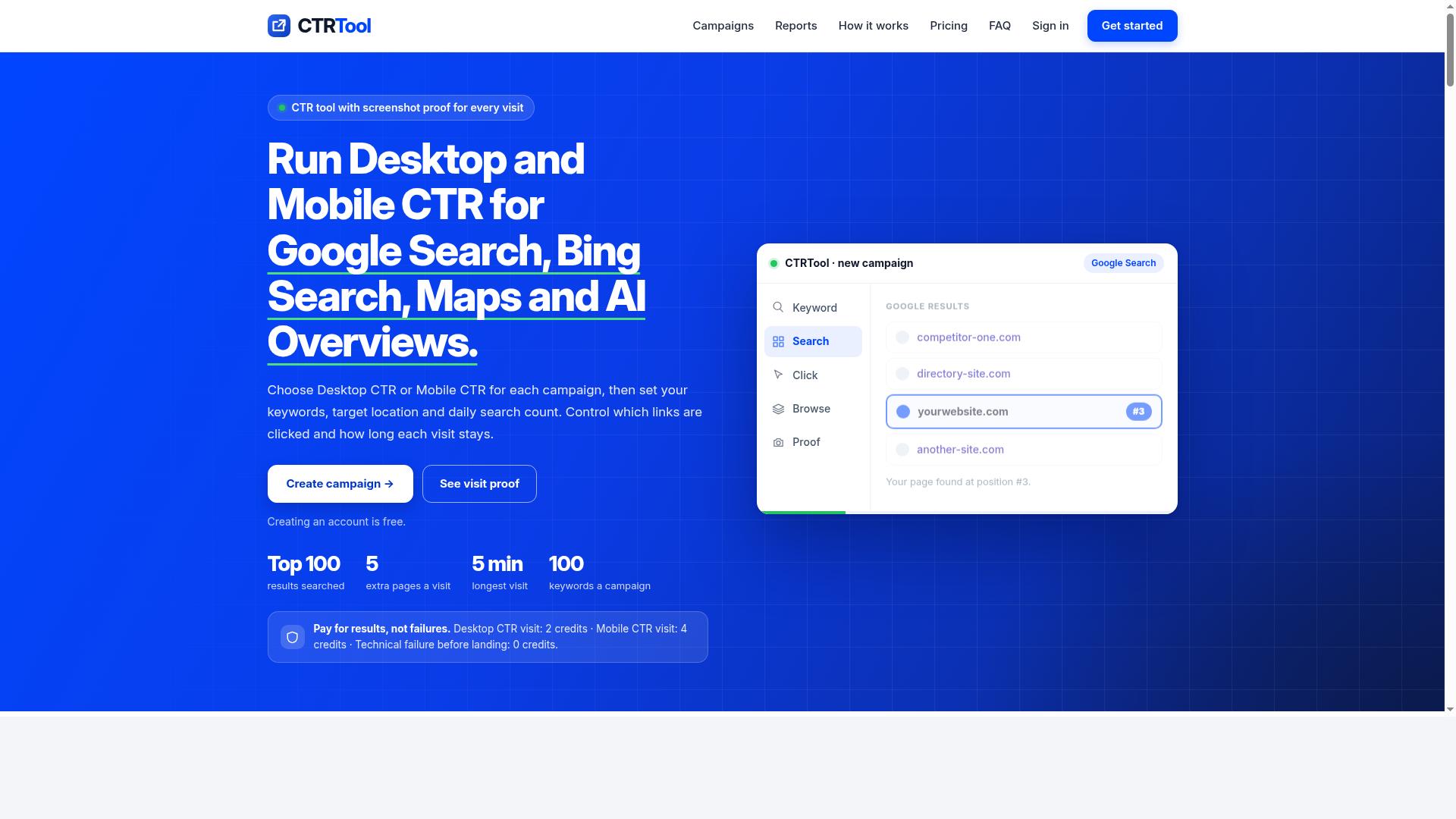
CTRTool is a SaaS platform that runs paid CTR campaigns for Google Search, Bing Search, Google Maps, and AI Overviews, delivering screenshot proof for every visit. It is an online software tool built for SEO practitioners and agencies who want to simulate organic clicks on targeted keywords and listings.
The core promise is straightforward: give the practitioner control over how automated visits reach a page, then show evidence that each visit happened. Screenshot proof for every visit is the platform's most distinctive claim, because it turns an otherwise invisible process into something you can inspect and document.
Within a campaign, users choose Desktop CTR or Mobile CTR, set keywords, pick a target location and daily search count, and control which links are clicked and how long each visit stays. Those controls matter for CTR manipulation, where click patterns, dwell time, and device mix all shape how a visit looks to analytics and to search engines.
CTRTool is also candid about limits. The site states plainly that automated visits do not guarantee rankings. That honesty is worth noting: CTR campaigns are a behavioral SEO tactic, not a ranking switch, and any platform claiming otherwise would deserve scrutiny.
Who CTRTool Serves and Which Search Surfaces It Covers
CTRTool is built for SEO practitioners and agencies running CTR campaigns for their own or client websites across Google Search, Bing Search, Google Maps, and AI Overviews. The audience is professional, not casual: people who already understand SERP ranking, keyword ranking, and search visibility, and who need a repeatable way to run and evidence campaigns.
Three groups fit that profile most naturally:
- SEO professionals testing behavioral SEO tactics on their own properties
- Agencies managing CTR campaigns on behalf of client sites
- In-house teams who want campaign control kept inside the organization
Coverage spans four search surfaces, which matters because CTR manipulation is not a single-channel exercise. Google Search and Bing Search handle classic organic listings, Google Maps covers local visibility, and AI Overviews addresses the answer layer now appearing above standard results.
Location targeting adds another layer of control. Campaigns can be aimed at a specific country, state, and city, or set to Any country to produce a mix of locations. For local SEO work, city-level targeting keeps click patterns closer to the geography a business actually serves. The site's own guidance also mentions using tier links, PBNs, and test properties, which signals the platform expects users to bring some infrastructure of their own.
For readers weighing CTRTool against SearchSEO, this is the first real point of comparison: the surface list and the location controls define what a campaign can actually reach before any question of results comes up.
Is CTRTool a Fit for CTR Manipulation as a SearchSEO Alternative?
CTRTool can be evaluated as a SearchSEO alternative by comparing how it executes CTR manipulation campaigns against the generic approach often associated with SearchSEO.
CTR manipulation means simulating organic clicks on search results so that behavioral signals, such as click-through rate and dwell time, shift in a site's favor. The goal is to make a page look like the result users prefer, which can support keyword ranking and search visibility over time.
The comparison below is not about which tool sounds more advanced. It is about how each approach runs a campaign and what evidence it gives you afterward. A generic SearchSEO-style service is usually described in broad terms, while CTRTool publishes its campaign mechanics and reporting openly.
The two sections that follow break the comparison into two parts. First, where CTRTool matches the CTR manipulation use case. Second, where it diverges from a black-box style service in ways that matter for anyone weighing paid CTR services.
Where CTRTool Matches the CTR Manipulation Use Case
CTRTool matches the core CTR manipulation use case by letting users run keyword-targeted click campaigns on Google and Bing search results, with Desktop or Mobile selection per campaign.
The building blocks line up with what a behavioral SEO campaign needs:
- Keyword and click targeting on organic results, including internal pages and link text, so SERP clicks land where the campaign intends.
- Desktop or Mobile choice per campaign, matching the device mix you want reflected in engagement metrics.
- Location targeting by country, state and city, or Any country, which keeps traffic quality closer to the intended audience.
- Daily search counts with now, spread out or gap timing, plus days, hours and time zone control, so click velocity looks natural rather than bursty.
Coverage extends beyond standard web search. CTRTool supports Google Search, Bing Search, Google Maps and AI Overviews, so campaigns can reach Maps listings and AI citation positions as well as classic blue links. Up to 100 keywords per campaign and search depth up to 100 give room to work across a keyword set rather than a single term.
In short, the platform covers the mechanics a CTR manipulation campaign depends on: targeted clicks, sensible pacing and the surfaces where search visibility is now decided.
Where CTRTool Differs From a Generic SearchSEO-Style Approach
CTRTool differs from a generic SearchSEO-style approach by providing screenshot proof for every visit and full visit paths, rather than operating as a black-box click service.
With a typical grey hat SEO click service, you send keywords and receive a completion count. You cannot see what the click bot did, where it landed, or whether the session resembled a real user. CTRTool instead returns search and landing screenshots as separate proof images, alongside full visit paths that show the route taken through the site, including up to five additional pages per visit.
Reporting goes further than proof of delivery. Keyword positions are tracked over time across Search positions, Maps listing order and AI citation order, which turns a campaign into a measurable record of keyword ranking movement rather than a one-off transaction.
The commercial model adds another layer of transparency. CTRTool runs on a credit-based system where no credits are charged for technical failures before landing, and visits that cannot verify the requested location use no credits. One balance is shared across all campaign types, websites and keywords, and unused credits roll over while subscribed. For buyers comparing paid CTR services, that structure removes much of the guesswork about what a click actually cost.
Key Features That Make CTRTool Stand Out
CTRTool's standout features center on verifiable proof for every click and granular campaign controls that let users tailor each CTR campaign. These two areas address the biggest doubts buyers bring to any paid CTR service: whether the clicks actually happened, and whether each visit matched the intended keyword, device, and location.
In CTR manipulation, trust and precision are the two common gaps. Without proof, a buyer has to take delivery on faith. Without controls, a campaign can drift away from the target audience and weaken the behavioral SEO signals it was meant to build.
CTRTool closes both gaps with evidence you can review and settings you can adjust per campaign. The sections below break down how each one works.
Screenshot Proof and Full Visit Paths for Every Campaign
Every CTRTool campaign includes screenshot proof for each visit, with search and landing screenshots provided as separate proof images. One image shows the search result that was clicked, the other shows the destination page that loaded. Together they confirm that a real visit took place rather than a counted click with nothing behind it.
Beyond the two proof images, reports include full visit paths. Users can see the route a visit took, including any additional internal pages, so the engagement looks like a genuine browsing session rather than a single bounce. This matters because bounce rate and dwell time are the behavioral signals a CTR campaign is trying to improve.
CTRTool also tracks keyword positions over time. Reports show Search positions, Maps listing order, and AI citation order. That means a user can watch a keyword ranking move across the same campaign that generated the clicks, instead of judging success by guesswork or a separate rank checker.
For anyone weighing a paid CTR service, this proof layer is the core trust feature. It turns a CTR campaign from an opaque purchase into something a buyer can audit visit by visit, which is exactly the kind of transparency that separates a serious tool from a click bot operation.
Campaign Controls: Desktop vs Mobile, Keywords, Location and Daily Counts
CTRTool gives users per-campaign control over device type (Desktop or Mobile), target keywords, geographic location, and daily click counts. Each of these settings shapes how natural a campaign looks to the search engine and how closely it matches the audience a site actually serves.
The main controls include:
- Device type: choose Desktop CTR or Mobile CTR for each campaign, with delivery through Desktop Chrome windows or real Android phone sessions.
- Keywords and target results: set up to 100 keywords per campaign and click a specific organic result within the top 100, with search depth configurable up to 100.
- Location: select country, state, and city, or choose Any country. Visits are matched to the target location through managed proxy routes.
- Daily counts and timing: configure daily search counts with now, spread out, or gap timing, plus days, hours, and time zone. Daily goals reset at 00:00 UTC.
- Visit depth: visits run up to five minutes with up to five additional internal pages, and users can set target URL, internal page URLs, link text, click order, and scrolling time.
Campaign types each apply these controls in their own way. Google Search CTR and Bing Search CTR click an organic result for a keyword. Google Maps CTR finds a business listing and clicks its website link, checking up to 50 listings with city targeting. AI Overview CTR requires finding the website in the overview and clicking its source link, which means a matching citation must exist.
Users can run up to 100 campaigns with 100 keywords each, and one credit balance is shared across all campaign types, websites, and keywords. Controls like these support precise click patterns and steady click velocity, which is what keeps a campaign aligned with organic user behavior signals.
Pricing and Plans
CTRTool offers monthly plans in USD: Starter at $59/month for 2,000 credits (up to 1,000 Desktop CTR visits or 500 Mobile CTR visits) and Growth at $125/month for 5,000 credits (up to 2,500 Desktop or 1,250 Mobile visits). Growth is marked Recommended on the site, which suggests it is the tier most buyers land on.
Two larger plans exist for heavier campaigns. Scale costs $399/month for 20,000 credits (up to 10,000 Desktop or 5,000 Mobile visits), and Agency costs $699/month for 40,000 credits (up to 20,000 Desktop or 10,000 Mobile visits).
| Plan | Monthly Price | Credits | Desktop Visits | Mobile Visits |
|---|---|---|---|---|
| Starter | $59 | 2,000 | Up to 1,000 | Up to 500 |
| Growth (Recommended) | $125 | 5,000 | Up to 2,500 | Up to 1,250 |
| Scale | $399 | 20,000 | Up to 10,000 | Up to 5,000 |
| Agency | $699 | 40,000 | Up to 20,000 | Up to 10,000 |
The credit model is straightforward: credits are consumed per visit, and Desktop visits cost fewer credits than Mobile. A Desktop CTR visit costs 2 credits, while a Mobile CTR visit costs 4 credits. That is why the same balance covers twice as many Desktop visits as Mobile ones.
Not every credit goes toward a delivered visit. A verified search without a match costs 1 credit, and a technical failure before landing costs 0 credits. For anyone running CTR campaigns, those rules matter because they set the real cost per successful SERP click.
Unused credits roll over while the subscription is active, then expire when cancellation takes effect. Creating an account is free, and custom development is quoted as a separate, agreed one-time fee.
One timing detail is worth noting for budget planning. The site displays limited launch pricing with the notice "Prices rise 30% on November 15," and the page also shows November 15, 2026. Buyers comparing CTRTool against SearchSEO or other paid CTR services should factor that into when they subscribe.
Trust Signals: Proof, Transparency and the Credit Model
CTRTool builds trust through verifiable screenshot proof, transparent credit consumption, and detailed visit reporting that shows exactly what was delivered. For anyone weighing CTRTool against SearchSEO or other paid CTR services, these trust elements matter more than feature lists. They answer the practical question every buyer asks: how do I know the work actually happened?
Trust in CTR manipulation services is hard to earn because the work is invisible by nature. Automated clicks happen off your screen, so the only way to judge a provider is through evidence. CTRTool treats proof as a core part of the product rather than an afterthought.
Screenshot proof for every visit is the foundation. Each visit produces search and landing screenshots as separate proof images, so you can see the query and the page that was reached. This removes the guesswork that surrounds anonymous click bots and paid CTR services.
Proof images are paired with full visit paths. Instead of a bare count of SERP clicks, you see the route a visit took through your site. That level of detail lets you check whether delivered visits resemble genuine user behavior signals rather than flat, one-step traffic.
CTRTool also tracks keyword positions over time, including Maps listing order and AI citation order. This gives you a longitudinal view of keyword ranking movement instead of a single snapshot. Over weeks of CTR campaigns, you can compare position history against delivered visits and judge progress on your own terms.
Position tracking matters because behavioral SEO results compound slowly. Seeing how a keyword moves across the SERP, and where your Maps listing sits, helps you separate real movement from normal fluctuation.
The pay-for-results credit model ties payment directly to delivered visits. Credits are not charged for technical failures that occur before landing. Visits that cannot verify the requested location also use no credits, which protects you from paying for traffic that misses its target.
There are no hidden fees, and you can see exactly how credits are spent. One credit balance is shared across all campaign types, websites and keywords, so nothing is siloed or quietly drained. Unused credits roll over while you are subscribed.
Scale is visible up front too: up to 100 campaigns with 100 keywords each sit under that single balance. For buyers comparing CTRTool with SearchSEO, this transparency turns the credit model into a trust signal rather than a billing detail.
Taken together, these elements support a clear verdict. CTRTool is a legitimate, accountable option for CTR manipulation because every claim can be checked against screenshots, visit paths, position history and a credit ledger that charges only for verified results.
Who Should Use CTRTool
CTRTool is best suited for SEO practitioners and agencies running CTR campaigns for their own or client websites across Google, Bing, Maps, and AI Overviews. The platform is built around CTR manipulation as a deliberate strategy, not a side feature, so the people who get the most from it already understand how SERP clicks and user behavior signals fit into a broader campaign.
That audience is not a casual one. These are professionals who treat click-through rate as a measurable input to SERP ranking and who want a single tool to run and organize those campaigns. If you are weighing CTRTool against a SearchSEO-style alternative, the question is less about raw capability and more about whether your workflow matches the use cases below.
SEO professionals managing multiple client sites. When you run campaigns for several properties at once, keeping each one organized matters as much as the clicks themselves. CTRTool is aimed at practitioners who need to manage campaigns across Google Search, Bing Search, Google Maps and AI Overviews without rebuilding their process for every client.
Agencies needing proof of delivery. Agencies answer to clients, and clients ask what was done. A dedicated platform gives an agency a structured place to run CTR campaigns and report on them, rather than improvising with scattered tools. That structure supports accountability and makes the work easier to present.
In-house teams testing behavioral signals. Some teams want to understand how user behavior signals interact with keyword ranking before committing budget to a paid CTR service. CTRTool's guidance explicitly mentions test properties, which fits teams that prefer to validate an approach on controlled sites first.
Campaigns that lean on tier links and PBNs. CTRTool's guidance also references tier links and PBNs as part of campaign strategy. Teams already comfortable with these grey hat SEO structures will find the tool aligned with how they work. Those who avoid such methods entirely should recognize the mismatch up front.
It also helps to know who should look elsewhere. CTRTool is not designed for people who want purely white hat SEO with no simulated clicks at all. If your strategy rules out automated clicks or behavioral manipulation on principle, the platform's core purpose will not serve you, and no amount of feature comparison changes that.
Likewise, anyone expecting a passive, set-and-forget search visibility tool should reset expectations. CTRTool is a campaign tool, meaning the user drives the strategy. The value comes from how well you plan click patterns, manage traffic quality, and interpret results alongside your analytics and conversion tracking.
The practical takeaway is straightforward. If you are an SEO professional or agency already running or planning CTR manipulation campaigns, and you want one platform covering multiple search surfaces with support for tier links, PBNs and test properties, CTRTool fits the brief. If your work must stay strictly white hat, it is simply the wrong tool for the job.
Final Verdict: Is CTRTool the Right Fit for You?
CTRTool is a strong fit for SEO practitioners and agencies who need verifiable CTR campaigns with screenshot proof, granular controls, and transparent credit-based pricing. The tool is built around a specific job: running CTR manipulation campaigns that you can inspect, adjust, and document rather than guess at.
If you are comparing it to SearchSEO or weighing paid CTR services in general, the deciding factor is usually proof and control. CTRTool leans into both. Campaigns come with screenshot evidence, and the credit-based model keeps spending visible as you scale activity up or down.
That transparency matters in a space where many providers ask for trust without showing their work. For teams already practicing behavioral SEO, CTRTool removes much of the uncertainty around what a paid CTR service actually delivers.
The fit is strongest for:
- Agencies running CTR campaigns across multiple client keywords
- SEO practitioners who want screenshot proof before reporting results
- Teams that prefer granular controls over one-size-fits-all packages
- Buyers who value transparent, credit-based pricing over opaque retainers
There is an honest limitation to state plainly. CTR manipulation sits in grey hat SEO territory. It is not a white hat tactic, and any tool in this category carries risk of Google penalties if campaigns are run carelessly or at unnatural scale.
CTRTool gives you the controls and transparency to manage that risk deliberately, but it cannot remove it. Buyers should understand this before committing budget, and should treat traffic quality settings and campaign pacing as core parts of the job, not optional extras.
For readers weighing CTRTool against SearchSEO or other approaches, the practical question is simple. Do you want verifiable campaigns with visible controls and pricing you can track, or a service where those details stay hidden? CTRTool answers that question clearly in its own favor.
If you have questions about whether CTRTool suits your workflow, or you want to get started, contact support at vaibhav@autoblogging.ai. The team can address specifics directly, and you can also review the site's Support, Terms of use, and Legal notices pages before committing.
Frequently Asked Questions
What exactly does CTRTool do, and how is it different from a generic CTR manipulation service?
CTRTool runs Desktop and Mobile CTR campaigns for Google Search, Bing Search, Maps and AI Overviews, and it provides screenshot proof for every visit-search and landing screenshots as separate proof images. You choose Desktop CTR or Mobile CTR per campaign, set your keywords and target location, and track keyword positions over time, including Maps listing order and AI citation order. That combination of verifiable proof and position tracking is what sets it apart from services that only promise clicks.
How does CTRTool's pricing work compared to a SearchSEO alternative?
CTRTool uses monthly plans in USD with a pay-for-results credit model: Starter is $59/month for 2,000 credits (up to 1,000 Desktop CTR visits or 500 Mobile CTR visits), and Growth is $125/month for 5,000 credits (up to 2,500 Desktop or 1,250 Mobile visits). Because credits map directly to delivered visits, you can estimate your cost per campaign before committing. We can't speak to any competitor's specific pricing, so compare plans against your actual monthly visit volume.
Which platforms and campaign types can I run with CTRTool?
CTRTool supports Google Search CTR (search your keyword and click the organic result, Desktop or Mobile, Top 100 results, including internal pages), Bing Search CTR, Google Maps CTR (find the business listing and click its website), and AI Overview campaigns, which require a matching source link. Campaigns can target a chosen country and optionally a state and city, or "Any country" to use a mix of supported locations. This makes it straightforward to run consistent campaigns across multiple search surfaces from one tool.
What proof do I get that the clicks actually happened?
Every visit in CTRTool comes with screenshot proof-search and landing screenshots as separate proof images-plus full visit paths. You also get keyword position tracking over time, including Maps listing order and AI citation order, so you can see movement alongside the delivered visits. For agencies running campaigns for client sites, that documentation is useful for reporting and verification.
Are there eligibility requirements for keywords and listings?
Yes. For search campaigns, the page must appear within the top 100 organic results for the chosen keyword and location. Maps campaigns check up to 50 listings (about five pages), and AI Overview campaigns need a matching source link. Checking these requirements before launching helps ensure your campaign can actually deliver visits.
Who is CTRTool built for, and how do I get support?
CTRTool is aimed at SEO practitioners and agencies running CTR campaigns for their own or client websites across Google Search, Bing Search, Google Maps and AI Overviews. It's a global online service with no stated country restrictions. If you have questions before signing up, you can reach support at vaibhav@autoblogging.ai.